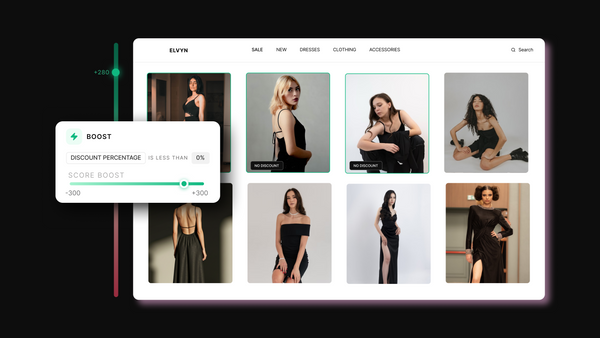
Use Size Count or Size Percentage conditions to include only products with enough sizes in stock
PROMOTE
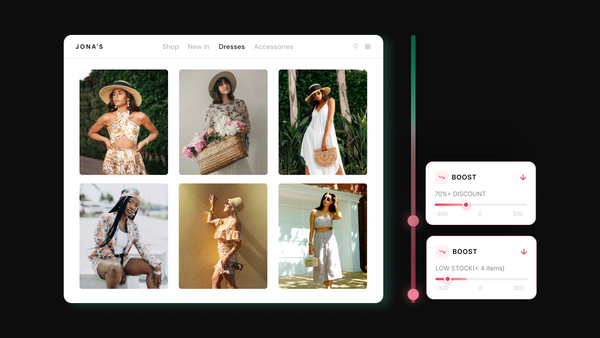
Boost your most selling sizes to the top
Identify which specific sizes drive your revenue and give those products more visibility
Show products shoppers can actually buy in their size
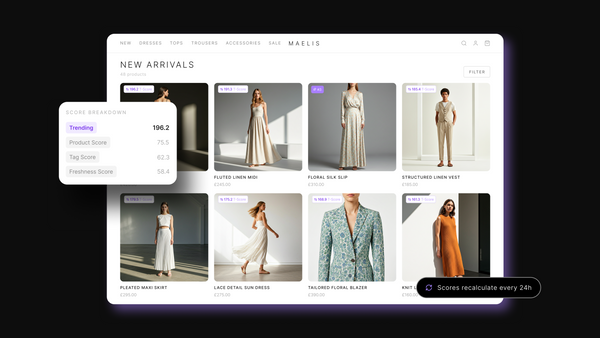
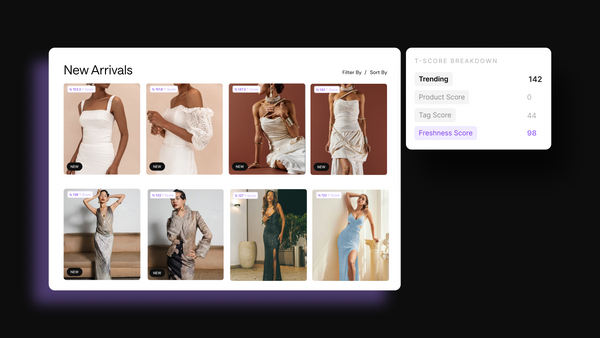
Control which products appear on your collections and in what order, based on real size availability. Use size count, size percentage, or boosts to push in-stock products higher and move low-availability ones down.
Your collections reflect what shoppers can actually buy - improving experience, reducing drop-offs, and increasing conversion.
Tagalys makes merchandising effortless on Shopify Plus. Their data-driven sequencing and sorting drastically improved our effectiveness. Tagalys takes the guesswork out of merchandising and product recommendations.
Vanja S
Head of eCommerce & Digital
“
The platform consolidates multiple tasks into one intuitive interface. The customer support is responsive and helpful. The Trending score does the hard work for us, and we can easily replicate merchandising strategies across sites.
Rocky Matsuura
eCom Trading Manager
“
Tagalys is the powerful, reliable data-driven solution we needed for search and merchandising on our Shopify Plus store. There’s no limit as to how custom you can get with your merchandising, which is exactly what we were after!
Rafaelle C.
eCommerce Manager
“
Wonderful supporting team who puts customers first. I love that Tagalys listens to customer needs and has an innovative, agile team that continuously works on improving the platform and addresses those needs.
Ryan R
Digitial Optimisation Manager
“
I appreciate the responsiveness and reactivity of the Tagalys team. The tool has great user-friendliness and has allowed us to boost sales with cross-sell features. We can pin our entire product catalogue and control the entire website's merchandising.
Maria M
E-Merchandiser & Content Manager
“
The ideal app for visual merchandising and easy reporting. Merchandising is extremely easy to execute with dynamic rules that work while you sleep. The team is proactive with its roadmap and helps us stay on top of trends.
Alex Harley
Head of eCommerce
“
The platform has exceptional usability, and the support team provides quick, efficient responses. The pinning features let us mirror our in-store merchandising while showcasing best sellers and new arrivals.
Natasha de Weerd
eCommerce CX Manager
Common questions
Everything you need to know
Tagalys Size Merchandising lets you control which products appear on your Shopify collection pages and in what order, based on real size availability. Instead of showing every product regardless of how many sizes remain, you can promote products with strong size depth, demote products where only unpopular sizes are left, and prioritise the specific sizes that drive the most revenue on your store. The result is a collection page where shoppers consistently find products available in sizes they can actually buy.
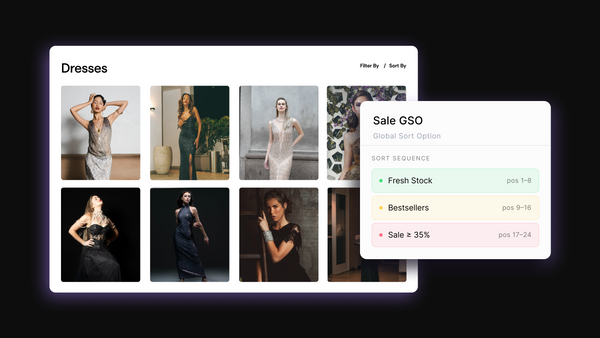
Size Count lets you set a condition based on the number of sizes available for a product. For example, only promote products that have 3 or more sizes in stock. Size Percentage lets you set a condition based on the proportion of a product's total size range that is currently available. For example, only surface products where at least 60% of their sizes are in stock. Both conditions work within Sequences, boosts, and Global Sort Options. Which one you use depends on whether you think about size availability in absolute numbers or relative to a product's full range.
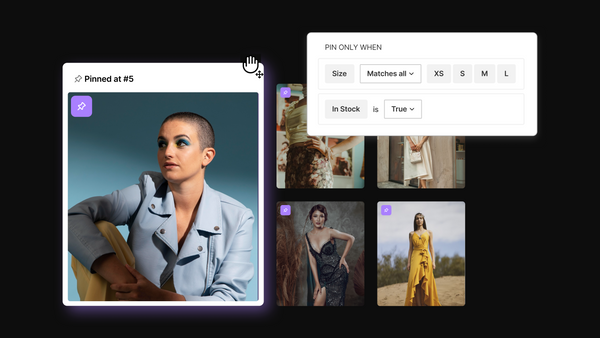
Yes. Tagalys Size Merchandising lets you set conditions based on specific sizes, not just count or percentage. If S and M drive the majority of your revenue, you can create a boost or Sequence that gives priority to products available in those sizes. You can set the condition to match any, all, or except certain sizes, giving you precise control over which size combinations earn the best positions on your collections.
A Global Boost applies your size condition across all collections at the store level, increasing the Trending Score for products that match your condition wherever that sort order is active. A Local Boost applies the same logic but only within a specific collection. If you want to prioritise full size range products across your entire store, use a Global Boost. If you want to apply a size condition only to your New In collection without affecting everything else, use a Local Boost. A Global Boost influences ranking but does not guarantee position. For a guaranteed position, use a Sequence instead.
One of the most common causes of drop-off on a product detail page is a shopper finding their size is unavailable. By the time they get there, the click has already been wasted. Tagalys Size Merchandising addresses this earlier in the journey, at the collection page level. By promoting products with strong size availability and pushing size-limited products lower, shoppers are more likely to click on products they can actually buy, which reduces wasted clicks and improves add-to-cart rates.
Yes, and this is one of the most valuable times to use it. During a sale, size availability changes rapidly. Products that were fully stocked can become size-limited within hours. With Tagalys Size Merchandising active, your collections automatically reflect real-time stock depth. Products that have sold down to fringe sizes move lower. Products with strong availability stay visible. Your collection stays shoppable even as inventory depletes.
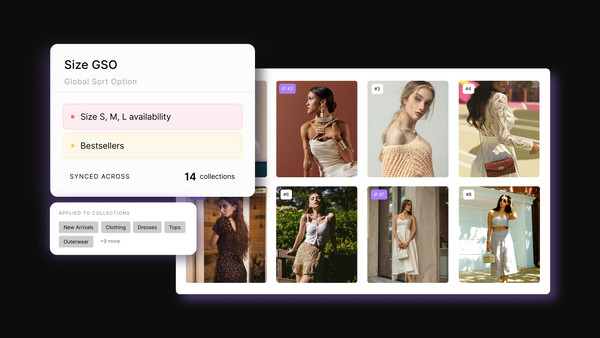
Yes. Save your size-based strategy as a Global Sort Option and apply it to as many collections as you need in one step. This is useful when you want consistent size-aware merchandising across Dresses, Tops, Co-ords, and New In without setting each one up individually. The GSO view shows you exactly which collections the strategy is applied to, so nothing falls out of sync.
Yes. Size Count and Size Percentage can both be used as conditions when building aisles with Sequences. You could create an aisle that only contains products available in your core sizes, sorted by trending, followed by an aisle of extended sizing options. This gives your collection a clear size-aware structure without any manual pinning, and it updates automatically as stock changes.
WHAT’S STOPPING YOU?
Smarter merchandising starts here.
Tell us what you want to improve, and we’ll help you choose the right plan.